|
Compatibility with the GNU tool chain protects your investment in the way you develop software on and for Linux* based systems. Use Intel C++, GCC or both! |
|
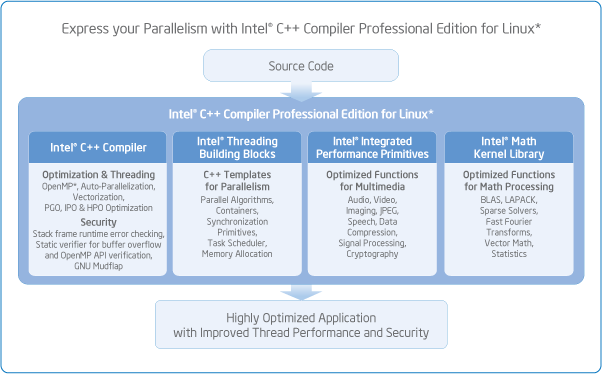
Multi-Threaded Application Support, including, new in 11.0, OpenMP 3.0 (data- and now task-parallelism), and auto-parallelization for simple and efficient software threading. |
|
Auto-vectorization parallelizes code to utilize the Streaming SIMD Extensions (SSE) instruction set architectures (SSE, SSE2, SSE3, SSSE3, and SSE4) of our latest processors. |
|
High-Performance Parallel Optimizer (HPO) restructures and optimizes loops to ensure that auto-vectorization, OpenMP, or auto-parallelization make best use of cache and memory accesses, SIMD instruction sets, and multiple cores. Compiles in a single pass, improving compile-time and producing more reliable code. |
|
Interprocedural Optimization (IPO) dramatically improves performance of small- to mid-sized functions, especially in programs containing calls within loops. IPO analysis gives feedback on vulnerabilities and coding errors, such as uninitialized variables or OpenMP API issues, which cannot be detected as well by other compilers. |
|
Profile-guided Optimization (PGO) improves application performance by reducing instruction-cache thrashing, reorganizing code layout, shrinking code size, and reducing branch mispredictions. |
|
Intel® Threading Building Blocks, the award winning C++ template library that abstracts threads to tasks creating reliable, portable and scalable parallel applications. Intel TBB is the most efficient way to implement parallel applications and unleash multi-core platform performance. |
|
Intel® Math Kernel Library includes optimized and scalable math routines for maximizing performance and seamlessly provides forward scaling from current to future many-core platforms. |
|
Intel® Integrated Performance Primitives is an extensive library of multi-core-ready, highly optimized software functions for multimedia data processing, and communications applications. |
|
Optimized-Code Debugging with the Intel® Debugger improves the efficiency of the debugging process on code that has been optimized for Intel® architecture. New threaded code debugging features and new GUI. |
|
New, integrated, simplified installation gets you going with all capabilities quickly and easily. Simplified ‘custom’ install makes it easy to identify just the components you want. |
New Processor Support |
Intel® ATOM Processor. Create high-performance and battery saving applications for new Mobile Internet Devices! |
| Compiler & Debugger |
New exception handling |
The same user-settable options produce better-optimized code, which leads to improved application performance. |
| C++ lambda functions |
Already part of the next C++ standard, Intel C++ Lambda functions available now to simplify template calls to templates and libraries like STL and Intel TBB. A simpler way to add parallelism. |
| OpenMP* 3.0 |
OpenMP raises the parallelism abstraction away from the API, simplifying threading and making code more portable. Previously limited to loop-based data-parallelism, the new 3.0 standard simplifies both data and task parallelism. |
| Improved valarray option |
Templates of array operations that enable low level hardware features to enhance application performance. No source code change required to use! |
| SSE2 enabled by default |
Take advantage of new Intel Streaming SIMD Extensions – automatically – through the compiler. No messy low-level coding to get the most from Intel processors. Resettable for non-other hosts/targets. |
| Decimal floating point |
IEEE 754R Standard implementation overcomes otherwise unavoidable precision issues implied by binary FP formats. Great for banking, accounting, billing, and e-commerce. |
Parallel debugger for IA-32 and Intel® 64 architectures |
Outstanding multithreaded application execution control without added complexity. Serialization of parallel region, and detailed information on OpenMP constructs |
| New debugger GUI |
Eclipse rich-client-platform based GUI makes it easier to see your application parallelism. Also offers command-line support. |
| Thread-related front-end diagnostics |
Provides useful warnings about references and assignment to statically allocated variables and address references of statically allocated variables |
| Parallel compilation |
Supports your build by appropriately allocating files to available processors to take advantage of multi-core processors, and speed you through your edit/compile/debug cycle. |
| Static Verifier |
Find and analyze source file issues. Diagnostics include issues with OpenMP directives, boundary violations, memory corruptions, memory leak, buffer overflow, and uninitialized memory. |
| Intel® Threading Building Blocks (Intel® TBB) |
Loops, containers, mutexes, atomic operations, more |
Intel TBB provides developers with high-level, STL-like library functions to take advantage of parallelism in existing or planned code. Covering loops, containers, mutex controls atomic operations, complex task scheduling and more, Intel TBB simplifies threading, saves time and produces applications that scale as processors are added. |
| Task-oriented threading |
Eliminate the tedium and inefficiencies of threading low-level, heavy constructs close to the hardware. Thread the way you think about your application and let the Intel TBB run-time library worry about the threads. |
| Threaded Performance |
Intel® Threading Building Blocks focuses on the particular goal of parallelizing computationally intensive work, delivering higher-level, simpler solutions. |
| Scalable Performance thru data-parallelism |
Intel Threading Building Blocks emphasizes data-parallel programming which scales well to larger numbers of processors by dividing the collection into smaller pieces. With data-parallel programming, program performance increases as you add processors. |
| Debug and release libraries |
Intel TBB functions come in debug and release forms to support extensive internal checking before building the production version of your software with the release form of the Intel TBB function. This simplifies development and delivers great performance. |
Intel® Integrated Performance Primitives (Intel® IPP) |
Intel® Core™ i7 and Atom™ processor support |
Support for new processors continues to future-proof your investment with the assurance of support for each successive generation of processors. That's a key advantage in a world where new hardware platforms come to market with awesome speed. |
| Deferred Mode Image Processing (DMIP) Layer |
Introduced as a sample on top of Intel IPP libraries, this provides solutions for pipelined image operations on larger images, utilizes in memory optimization and improves performance in multi-threading environment. |
| Unified Image Codec (UIC) framework sample library |
Standardizes plug-and-play interfaces for various image codecs (JPEG, JPEG2000, etc.) to improve ease of implementation and maintenance. |
| Threaded Static libraries for all functional domains |
Brings the benefit of higher performance threading to static library users. |
| High level LZO data compression library + improved Zlib, gzip and bzip2 algorithms |
High performance implementations of most popular data compression algorithms using standard interfaces for ease of use. |
| Data Integrity Functional Domain |
Reed-Solomon error correcting codes to preserve integrity of data in transmission, storage, and encoding. |
| Variety of new functions and enhancements to IPP samples |
Continued added value in response to user requests for added functionality, including new signal and image processing transforms and codec enhancements. |
Intel® Math Kernel Library (Intel® MKL) |
New “layered” architecture |
The new architecture provides maximum support for different development environment configurations and processors in a single package. |
| New threading layer |
Link to the version of this layer that matches your development environment, and rest assured that Intel MKL will not have threading incompatibilities with the threading in your application. |
| Discrete Fourier Transform Interface |
The DftiCopyDescriptor function has been added for convenience when using the FFTs. The size of statically linked executables calling DFTI has been reduced significantly, and complex storage is now available for real-to-real transforms. |
| LAPAC enhancement |
The capability to track and/or interrupt the progress of lengthy LAPACK computations has been added. A function called mkl_progress can be defined in a user application, which will be called regularly from a subset of the MKL LAPACK routines. |
| VML extensions |
With performance in mind, all VML functions are now threaded. And a new “Enhance Performance” mode is offered for applications where math-function inaccuracies do not dominate parameter inaccuracies (e.g., Monte Carlo simulations and media applications). |
| Sparse BLAS extensions |
Improvements include threaded level-3 sparse BLAS triangular solvers and support for all data types (single precision, complex and double complex). |
Other Features |
| New Linux Support |
Fedora* 9, Ubuntu* 8.04, GNU tool chain 4.2 & 4.3. See System Requirements for complete list. |
| Simplified installation |
Streamlined ‘complete’ installation for a seamless, near one-step installation of all components. |
| New Online Support Community |
Our enhanced, online community-support forums and knowledge-base search capabilities help you find answers more quickly. This is in addition to private, password-protected accounts available with Premier Support. |
| Processor Support |
The addition of support for Intel® Atom™ processors continues to future-proof your investment with the assurance of support for each successive generation of processors. That's a key advantage in a world where new hardware platforms come to market with awesome speed. |
|
A system based on an IA-32 architecture processor supporting the Intel® Streaming SIMD 2 Extensions (Intel® SSE2) instructions (e.g. Intel Pentium® 4 processor), or an Intel® 64 architecture processor |
|
512 MB of RAM (1GB recommended) |
|
2GB free disk space for all features |
|
One of the following Linux distributions (this is the list of distributions tested by Intel; other distributions may or may not work and are not recommended - please refer to Technical Support if you have questions): |
 |
| - |
Asianux* 3.0 |
| - |
Debian* 4.0 |
| - |
Fedora* 9 |
| - |
Red Hat Enterprise Linux* 3, 4, 5 |
| - |
SUSE LINUX Enterprise Server* 9, 10 |
| - |
TurboLinux* 11 |
| - |
Ubuntu* 8.04 |
|
|
Linux Developer tools component installed, including GCC, g++ and related tools |
|
Linux component compat-libstdc++ providing libstdc++.so.5 |
|
If developing on an Intel® 64 architecture system, Linux component glibc-devel.i386 providing stubs-32.h |
|
A system based on an Intel® 64 architecture processor, or based on an AMD 64-bit processor |
|
512 MB of RAM (1GB recommended) |
|
2GB free disk space for all features |
|
100 MB of hard disk space for the virtual memory paging file. Be sure to use at least the minimum amount of virtual memory recommended for the installed distribution of Linux |
|
One of the following Linux distributions (this is the list of distributions tested by Intel; other distributions may or may not work and are not recommended - please refer to Technical Support if you have questions): |
|
| - |
Asianux* 3.0 |
| - |
Debian* 4.0 |
| - |
Fedora* 9 |
| - |
Red Hat Enterprise Linux* 3, 4, 5 |
| - |
SGI ProPack* 5 |
| - |
SUSE LINUX Enterprise Server* 9, 10 |
| - |
TurboLinux* 11 |
| - |
Ubuntu* 8.04 |
|
|
Linux Developer tools component installed, including GCC, g++ and related tools |
|
Linux component compat-libstdc++ providing libstdc++.so.5 |
|
Linux component containing 32-bit libraries (may be called ia32-libs) |
|
A system based on an Intel® Itanium® processor |
|
512 MB of RAM (1 GB recommended) |
|
2GB free disk space for all features |
|
One of the following Linux distributions (this is the list of distributions tested by Intel; other distributions may or may not work and are not recommended - please refer to Technical Support if you have questions): |
|
| - |
Asianux* 3.0 |
| - |
Debian* 4.0 |
| - |
Red Hat Enterprise Linux* 3, 4, 5 |
| - |
SUSE LINUX Enterprise Server* 9, 10 |
| - |
TurboLinux* 11 |
| - |
Ubuntu* 8.04 |
|
|
Linux Developer tools component installed, including GCC, g++ and related tools |
|
Linux component compat-libstdc++ providing libstdc++.so.5 |
|
IA-32 architecture system or Intel® 64 architecture system |
|
Java* Runtime Environment 5.0 (also called 1.5.0) |
|
IA-32 architecture system or Intel® 64 architecture system |
|
Eclipse* 3.4.x or 3.3.x |
|
Eclipse C/C++ Development Tools (CDT) 5.0.0 or 4.0.2 |
|
Java Run-Time Environment 5.0 (1.5.0) |
|
Minimum Hardware Required (per node) |
|
| - |
Intel® 64 architecture system or IA-64 architecture system |
|
|
Recommended Hardware (per node) |
|
| - |
2 GB of RAM |
| - |
10 GB of disk space |
|
|
Operating Systems: |
|
| - |
Red Hat* Enterprise Linux* 3.0, 4.0 |
| - |
SUSE Linux Enterprise Server* 9.0, 10.0 |
|
|
POSIX* threads: NPTL |
| For Infiniband* support: |
|
Open Fabrics Enterprise Distribution (OFED) 1.0 or later |
| The OFED software may be downloaded from https://svn.openfabrics.org/svn/openib/gen2/branch |
| Recommended Software |
|
Intel® Trace Analyzer and Collector |
|
Intel® Thread Profiler |
|
Intel® Thread Checker |
Cluster Requirements
One of the following supported communications fabrics: Ethernet*, Gigabit Ethernet*, Infiniband*, or any fabric that supports TCP/IP.
All nodes that will cooperate in the execution of a Cluster OpenMP* program must be running the same operating system and the same kernel version. The nodes should be as identical as possible with respect to mounted file systems and system paths.
There must be enough swap space available on disk for the program. In addition to the normal swap space needed by a Linux program, Cluster OpenMP* requires disk space allocated separately for sharable backing store. Sharable backing store is allocated in /tmp by default, and requires space equal to the size of twice the sharable pages allocated to the program. Use the --backing-store option in the kmp_cluster.ini file to allocate sharable backing store in some directory other than /tmp. |
| Notes: |
| 1. |
The Intel compilers are tested with a number of different Linux distributions, with different versions of GCC. Some Linux distributions may contain header files different from those we have tested, which may cause problems. The version of glibc you use must be consistent with the version of GCC in use. For best results, use only the GCC versions as supplied with distributions listed above. |
| 2. |
Compiling very large source files (several thousands of lines) using advanced optimizations such as -O3, -ipo, and -openmp may require substantially larger amounts of RAM. |
| 3. |
The above lists of processor model names are not exhaustive - other processor models correctly supporting the same instruction set as those listed are expected to work. Please refer to Technical Support if you have questions regarding a specific processor model. |
| 4. |
Some optimization options have restrictions regarding the processor type on which the application is run. Please see the documentation of these options for more information. |


 Print
Print